




Introduction to Cold Wallets: What is a Cold Wallet?
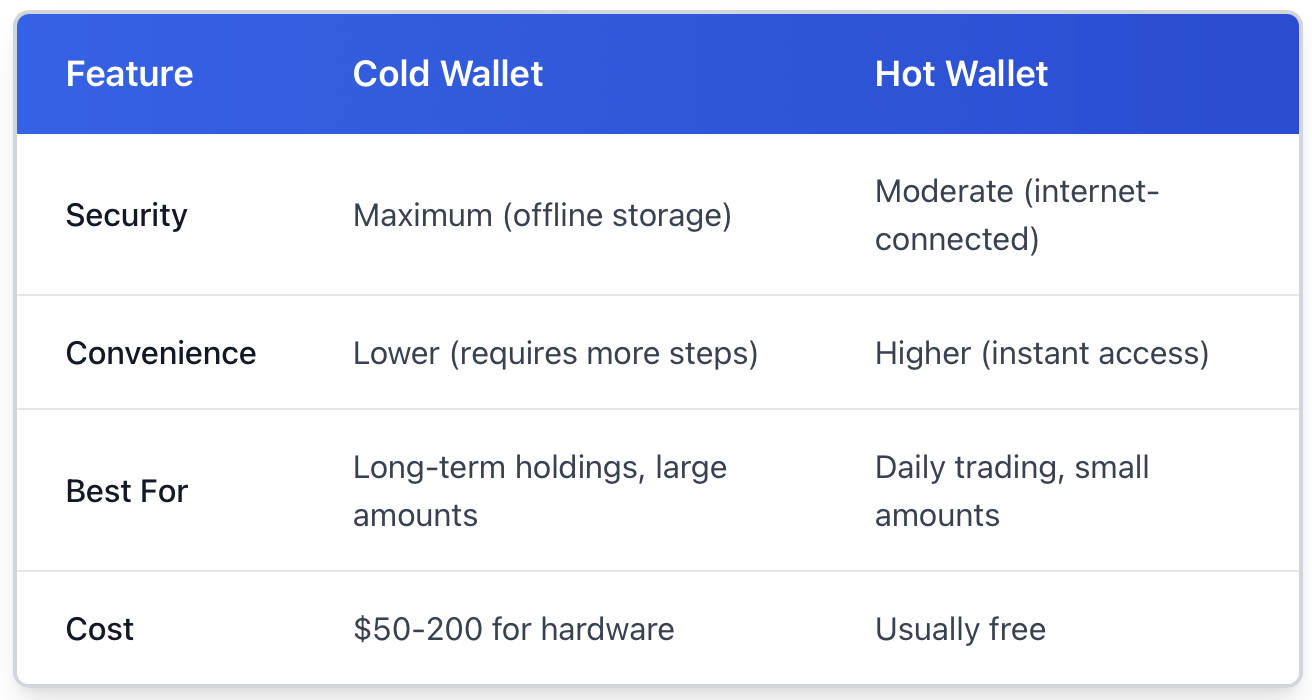
A cold wallet can be understood as a digital version of a safe that exists entirely offline. Unlike cryptocurrency stored on an exchange or mobile application, cold wallets store your private keys away from the internet altogether, which can be effectively unreachable for remote hacking.
The difference is all about connectedness. Hot wallets stay connected to the internet for expedient trading and transactions. They're helpful, though usually insecure. By dislocating your assets altogether, cold wallets give up some convenience for serious security. We could compare it to the cash in our pockets compared to the cash in the safe at home.
For anyone with a considerable amount of cryptocurrency, cold storage is non-negotiable. It's the gold standard in securing your investment from exchange hacks, phishing scams, and unauthorised access. This post will walk you through the different types of cold storage, how they actually work, and practical steps to get you started today.
Professional investors utilise hardware solutions like Ledger or enterprise-level cold storage with BitGo; however, this applies on any scale. Just like you wouldn't walk around with your life savings in your wallet, the same logic applies to your crypto.
Types of Cold Wallets: Which Cold Wallet Fits You Best?
Cold wallets aren't all identical. Your decision is based on the amount you're storing, how frequently you need to access it, and what risks you're worried about.
Hardware Wallets are the most common solution. These look like USB drives, with devices like Ledger Nano X and Trezor Model T being specialised computers designed for one utility: protecting your private keys. They allow you to sign transactions without revealing those keys to potential malware on your computer. They typically run between $70 and $200, and support a lot of different cryptocurrencies (hundreds). The downside of a hardware wallet? You need to keep the physical object safe! If you lose the device and your recovery phrase, your crypto is gone for good.
Paper Wallets reduce things to first principles: you create a private key and public address offline, print it out on paper, and then put that paper somewhere safe. You don't have to pay anything for it, except for ink and paper. The supporting argument is simple, and there are no electronic failure points. The downside is that they are fragile. Paper burns, water destroys paper, and ink fades over time. Also, when you are ready to spend, it will require you to import the key to the software, which introduces some risk once again.
Metal Wallets take care of the durability issue. These are simply paper wallets etched or stamped onto plates made out of steel or titanium. Companies like Cryptosteel or Billfodl will sell you kits where you manually create your recovery phrase with little metal tiles. They will survive house fires, floods, and rot. They are overkill if you are just trying to store a small amount of wealth, but they make sense for serious long-term savings. They start around fifty dollars and go up to one hundred and fifty dollars for the more premium versions.
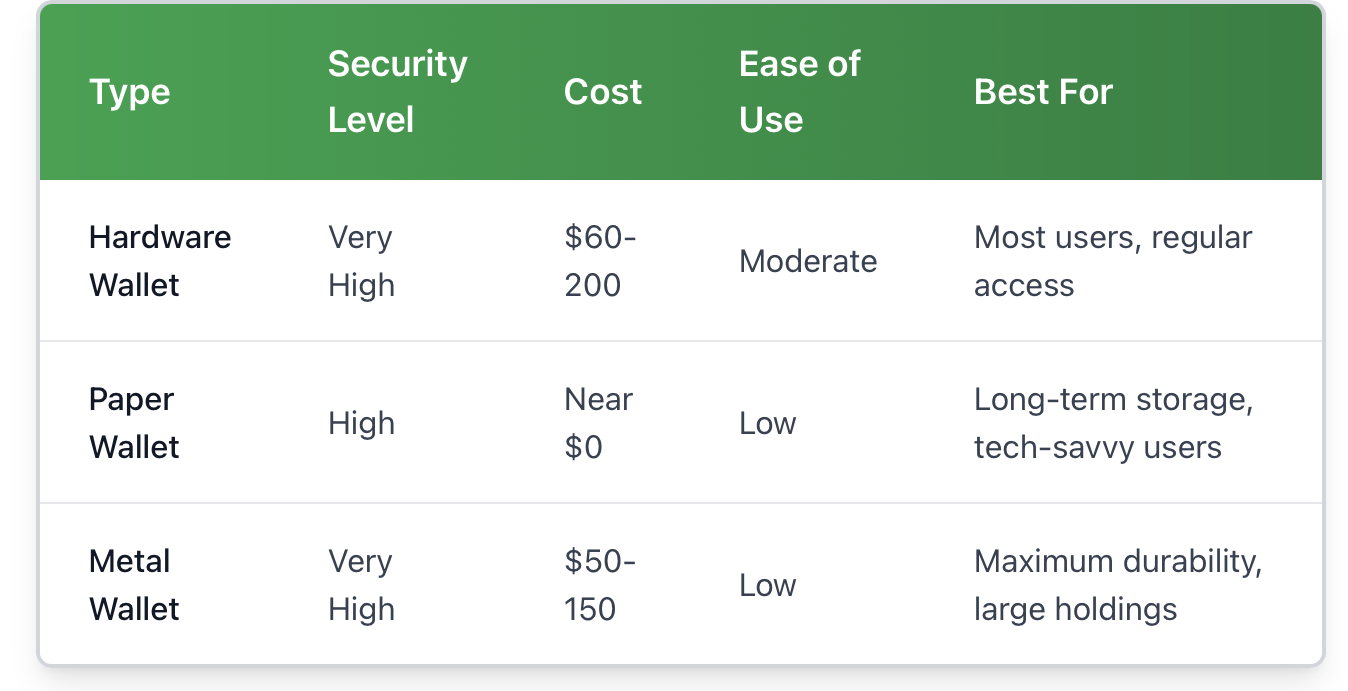
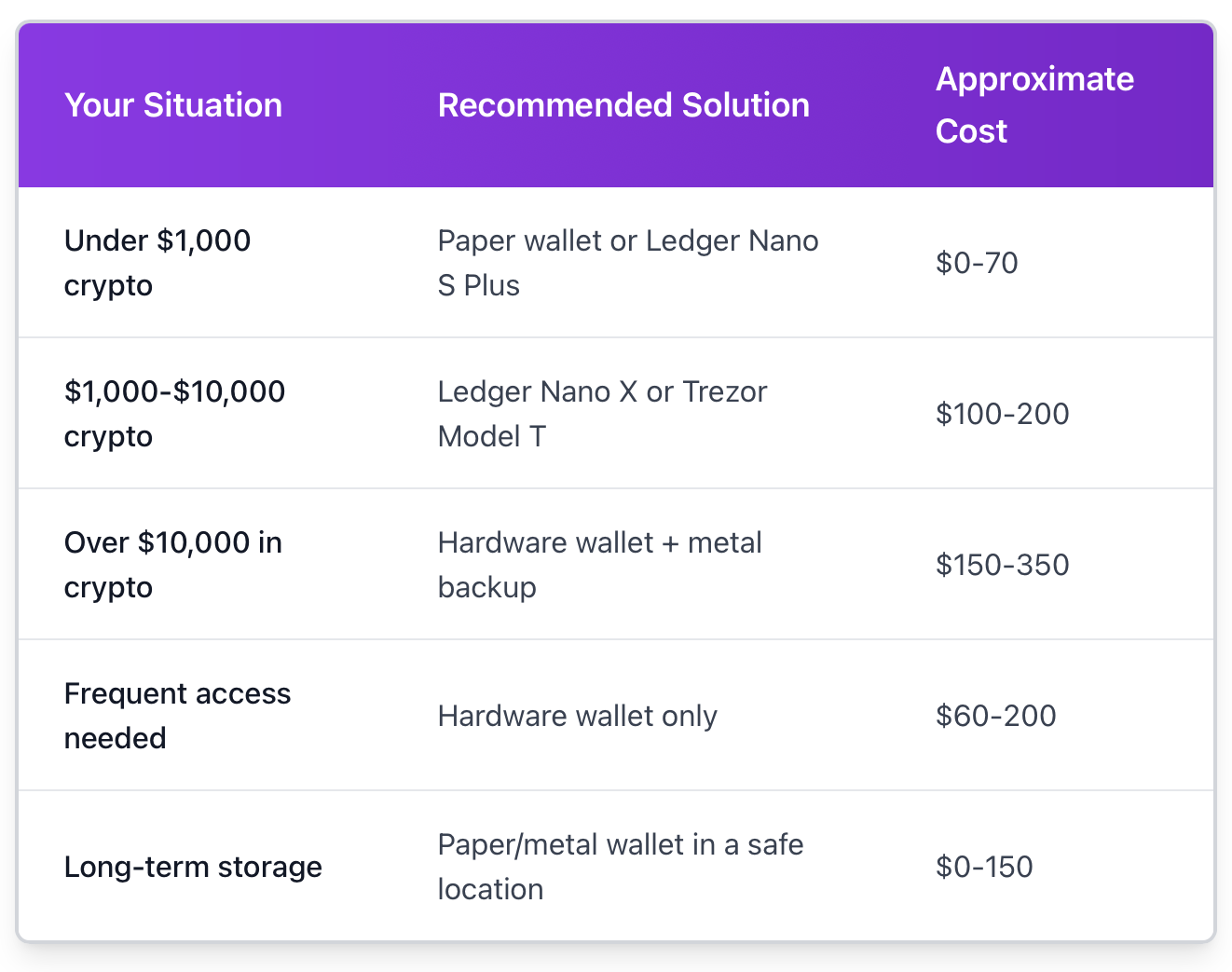
A hardware wallet, such as Ledger Nano S Plus, is pretty much the ideal solution for beginners holding modest amounts. If you have bitcoin that you're banker-style holding as an investment for several years and won't touch it often, a well-secured paper wallet or metal wallet is really all you need. Large investors most likely use several methods to secure their assets, spreading risk among different storage methods and physical locations.
How Cold Wallets Work: The Mechanics Behind Offline Storage.
Understanding how cold wallets work is uncomplicated if you first grasp cryptocurrency generally.
Every crypto transaction has two components: a public address (where people would send you money) and your private key (the key you use to authorise sending money out). Consider the public address to be your bank account number and the private key to be your signature. Anyone can deposit into your account, but only you can authorise a withdrawal.
A cold wallet stores that private key, completely offline. If you want to send crypto, you would create an unsigned transaction on whatever device is connected to the internet, transfer that unsigned transaction to the cold wallet (usually via USB, QR code, or SD card), sign the unsigned transaction with your private key, and then broadcast that transaction back from the device connected to the internet. At no point does your private key ever exist on the internet.
In a hot wallet, however, your private key is either on a server or a device with a connection to the internet. That connection is a vulnerability. Malware could theoretically steal your private key from your phone, or the app connected to the internet could be hacked. A cold storage wallet does not allow for any digital pathways to be exploited.
Let's look at a practical example. You want to send the recipient 0.5 BTC with a Ledger hardware wallet. You connect Ledger Live on your computer, input the recipient's address and amount and confirm the transaction on the Ledger device. Ledger device will create and sign the transaction using your private key stored on its secure chip, while the signing procedure never exposes the private key to your computer. Your computer just sent the signed transaction to the Bitcoin network. Even if your computer had keyloggers or malware, they wouldn't be able to compromise your private key.
Cold Wallet Transaction Flow:
-
Create an unsigned transaction on an online device
-
Transfer transaction data to the cold wallet
-
A cold wallet signs a transaction offline using the private key
-
Transfer the signed transaction back to the online device
-
Broadcast the signed transaction to the blockchain network
The signing transaction step is what makes cold wallets secure. Think of it like when you have a credit card that you lock in a safe at home. Whenever you want to make a purchase, you take it out from the safe, sign the receipt, put it back in the safe, and then you have someone else complete the transaction. At no time is your card left unattended and possibly stolen from your pocket when someone might've picked it.
Choosing the Right Cold Wallet for You
The best cold wallet really comes down to your personal situation. A one-size-fits-all recommendation misses the point.
Amount of the investment
Holding $500 in crypto? A paper wallet or basic hardware wallet is perfectly adequate. Holding $50,000? You definitely want redundant backups, quality hardware, or possibly metal seed phrase storage. It only makes sense for the investment spent on security to scale with what you are protecting.
How often do you transact?
If you are a buy-and-hold investor who looks at prices once a month, then a paper or metal wallet in a safe deposit box is an excellent choice. If you change your allocation weekly or want to access it every so often, then a hardware wallet is the best of both worlds. They remain secure, but can be used frequently enough to turn into a hassle.
What security risks do you worry about?
Do you live in an area with flooding or fires? If so, then metal wallets will help. Do you worry about physical theft? Using a hardware wallet and setting up a 6-digit pin adds an extra layer of protection even if the device is stolen. Do you worry about someone breaking into your house to obtain your cryptocurrency? Then you may want to consider using multisig instead or keeping key components in two separate locations.
Budget Factors
You can obtain crypto for free via a paper wallet; however, you will need a printer and a computer that has not been connected to the web, and it is ideally suited for this purpose. Hardware wallets will cost real money up front, but they will last you for years and hold multiple currencies. Metal wallets will cost an additional $50-150 pocket, but they will keep a permanent backup of your wallet.
If you are choosing a legitimate cold storage option, there is no wrong option. The wrong option is to leave everything on an exchange or a hot wallet. Use whichever cold wallet is appropriate for your budget and upgrade as your holdings increase.
How to Use a Cold Wallet: Step-by-Step Guide
Let's get practical. Here's how to actually set up and use different types of cold wallets.
Hardware Wallet Setup (Ledger/Trezor)
Set Up: Unbox your device and connect it to your computer. Download the device's official software (Ledger Live or Trezor Suite) and follow the instructions to set up a wallet.
-
Write Down Your Recovery Phrase: The device will display a series of 12 or 24 random words. Use the recovery card that is included with your device to write down these words. You will use this recovery phrase to restore complete access to your wallet in the event someone steals your device or if the device is lost. Don't take a picture of it, don't store the recovery phrase on your computer, and don't tell anyone your recovery phrase.
-
Select a PIN: You will also choose a four- to eight-digit numeric PIN code. After 3 failed attempts to enter the correct digit and/or numeric PIN code, most devices automatically wipe themselves clean, which provides an extra layer of protection if someone steals your device.
-
Install Apps: You will need to install applications for each cryptocurrency you're storing. You will need a separate app for each type of cryptocurrency (ex., you will need an app specifically for Bitcoin, an app for Ethereum, etc.)
-
Receive Your First Deposit: With your app open, select the app for the coin you'd like to receive, then select "Receive" and copy the wallet address displayed. It is a good idea to send a small amount as a test the first time you receive cryptocurrency.
-
Always verify and confirm: Always confirm it is the same receiving address displayed on your computer screen and your device screen. If you access the address from your computer using malware, it is possible that the address displayed and copied on your computer has been swapped. However, malware cannot change what is displayed on the hardware wallet itself.
Paper Wallet Creation
-
Go Offline: Disconnect your computer from the internet completely. Ideally, use an offline computer or boot from a clean flash drive using Linux.
-
Create Keys: Use a trusted open-source generator like bitaddress.org (you would have recorded the offline number before connecting), and move your mouse or type randomly to generate entropy.
-
Print Multiple Copies: Print at least 2 copies on a decent-quality printer. Some people use a dedicated printer that is never connected to the internet.
-
Store Copies Securely: Store the copies in different secure locations. Some people will laminate their copies or use plastic sleeves to reduce the risk of water damage.
-
Fund the Wallet: To fund the paper wallet, use the public address and send crypto to it. Send a small amount first as a test.
-
When You Need To Purchase: Import the private key (on paper) into the desktop wallet software. Most people will create a new paper wallet (with a new private key), since you just exposed the old private key to your online device.
Sending Crypto From Cold Storage
Although each device may vary slightly, the basic process is below:
-
Attach your hardware wallet to your loaded computer
-
Start your wallet software and navigate to send.
-
Enter the address and amount of the recipient.
-
Review the details of the transaction on your screen.
-
Confirm the transaction on the physical device.
-
The device will internally sign the transaction.
-
The computer will then broadcast the signed transaction to the network.
Be sure to verify addresses character by character. There is malware out there that swaps clipboard contents with an attacker's address. Protecting yourself by verifying the device screen is recommended.
Risks and Security Tips for Cold Wallets
Cold wallets significantly enhance security, but they are not risk-free. Knowing what else can go wrong will help you mitigate risk.
Physical Loss or Damage
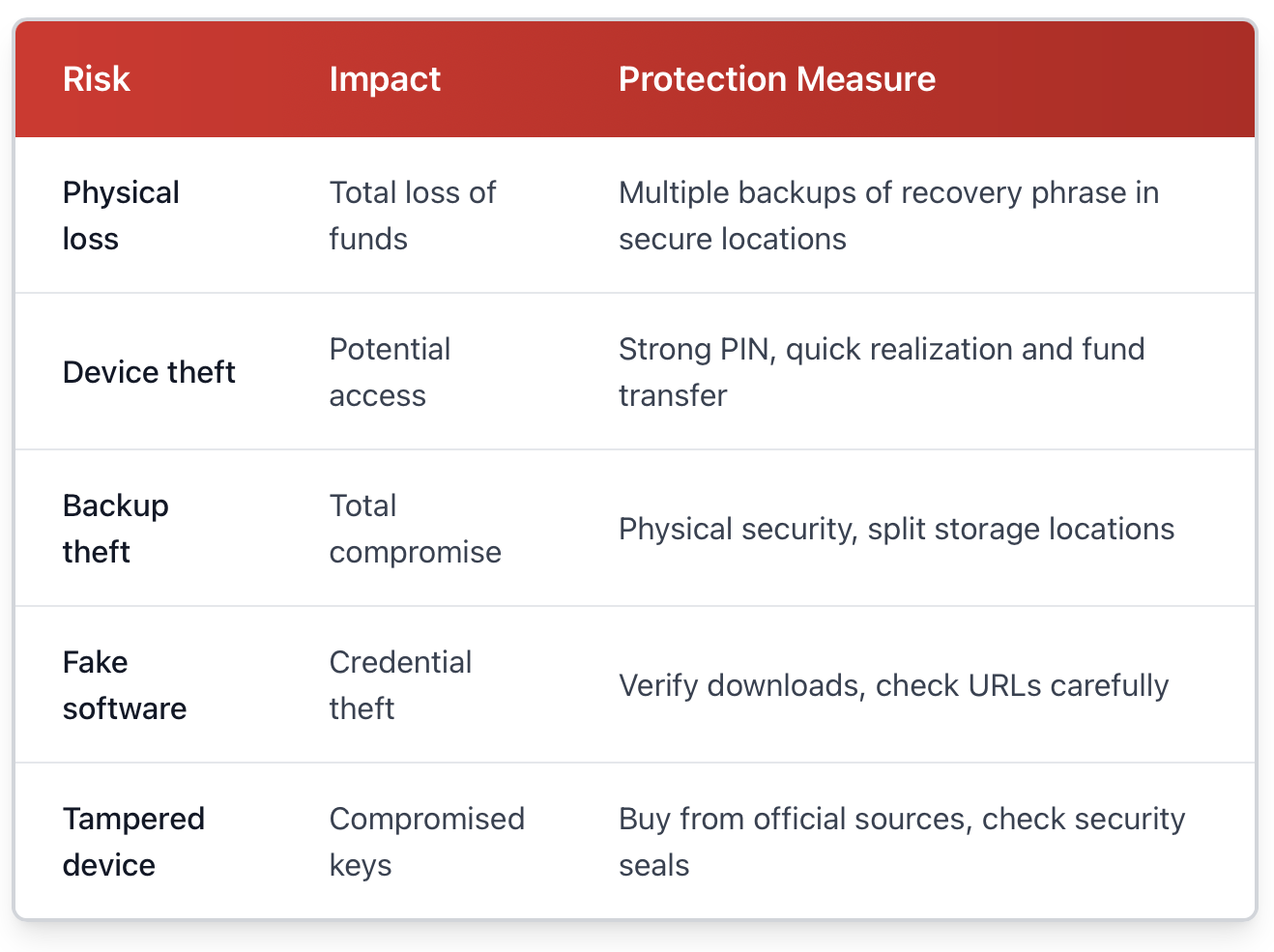
If you lose your hardware wallet in a lake or lose your paper wallet in a fire, your crypto is gone forever, unless you backed up your recovery phrase. This is by far, the greatest risk to you with cold storage. The solution is redundancy. Write down your recovery phrase in multiple secure locations, and consider sealing a copy in several safe deposit boxes or giving a copy to several trusted family members.
Theft of the Device
If someone steals your Ledger, it does not mean they have succeeded, but they are now in a closer position to access your funds. Again, hardware wallets require a PIN code, and often wipe themselves after so many attempts. Treat these devices like you would treat a wallet holding thousands of dollars. Do not leave them visible in your car, nor make a public announcement that you own one.
Backup Compromise
Your recovery phrase is just as important as your device. If anyone finds those 12-24 words, they could recreate your wallet on their own device. Write them down, but don't take a photo of them, don't store them in cloud services, and don't email them to yourself with a password manager. Treat it like the combination to a safe with everything you own.
Malware and Phishing
Even with cold storage, you are not immune to social engineering. Fake versions of Ledger Live or Trezor Suite exist and will try to get your recovery phrase. Only download software from official websites. Be suspicious of any email that starts by asking you to "verify" your wallet or access your firmware through a link.
Supply Chain Attacks
Buy hardware wallets directly from the manufacturer or from reputable resellers. Some scammers sell "pre-initialised" wallets that are designed to take your funds from you. If your hardware wallet comes to you with a recovery phrase, it is compromised. A legitimate hardware wallet will never come with a pre-generated seed.
Metal wallets offer a solution to durability concerns, although they introduce new issues for storage. A titanium plate holding your seed phrase cannot be destroyed, but should someone finds it, it is very clear that it is valuable. Some users have created puzzles or put their phrase in different places using Shamir's Secret Sharing.
The purpose is not to be paranoid. The purpose is to create a security level proportionate to the value of the assets. For example, it is reasonable to protect a $1,000 security journey differently than a $100,000 security journey. Most people are fine with a hardware wallet kept in a safe in your home, and store a backup recovery phrase in a bank safe deposit box.
Best Practices for Cold Wallets
Good habits create multiplicative effects for your security objects. This is what the seasoned user does right.
Update Firmware
Hardware wallet companies are always finding and patching vulnerabilities. Ledger, Trezor, and others send firmware updates out several times a year. Just set a reminder to check on a quarterly basis. Always be sure that the firmware you download is genuine and from the official software before installing any updates.
Test Your Backups
You do not want to find out that disaster struck and your recovery phrase does not work. After the initial setup up wipe your device completely and use your backup phrase to set your device back up. Do this in a private setting (no one can see your seed phrase).
Never Reuse Addresses
Most wallets today will automatically create new addresses, but some do not; for those, it becomes easy to audit the history of your transactions and total amount held by using an address more than once. Using a new address for each transaction, however, is better for privacy.
Use Passphrases for Large Holdings
Some hardware wallets will allow an optional 25th word (a passphrase) in your 24-word recovery phrase. This, in effect, forms a hidden wallet. Even if someone discovers the 24 words, they will not be able to access the wallet without the passphrase. You should store the passphrase in a location other than the recovery phrase.
Verify Smart Contract Permissions
When using Ethereum or other smart-contract-related tokens, your hardware wallet will display the permissions you are signing. These should be read carefully. Blind signing is how many people get their wallets drained by malicious DeFi apps.
Practice Physical Operational Security
Don't speak publicly about your holdings or your cold wallet setup. Don't share pictures of your hardware wallets on social media. Be boring and reserved about security measures. The safest safe is the one that's unknown.
Planning for Heirs
If something happens to you, could your family obtain access to your crypto? If you have a will or an estate, perhaps consider leaving behind instructions with the will or in the estate documents. There are even services that will time-release this information, either after a predetermined time frame of inactivity and even though this opens up new assumptions for trust.
The security community will tell you to use the 3-2-1 backup strategy: Have three copies of your recovery phrase on two different media and one stored off-site. If you're using cold wallets, that might mean one at home, one in a safe deposit box, one with a trusted family member (even if you just seal the envelope to create a dead-man switch).
Protect Your Assets Now
Cold wallets represent your single best step to protect your cryptocurrency holdings. Exchanges get hacked. Hot wallets get breached. Tree or leave your hardware out of sight and store the recovery phrase securely to have your peace of mind in knowing that even if everything else gets hacked and breached, these assets are safe.
The comfort trade-off is real, but it's not painful. You'll have to spend a few minutes per transaction. The first setup is one or two hours maximum. The elapsed time is a poor argument because it is far outweighed by your comfort in knowing with certainty that your assets just can't be stolen in the next exchange breach.
Keep it simple. If you're holding more than you would be okay losing, move it to cold storage today. A basic Ledger or Trezor (hardware wallets) can range from $50-100. That's cheaper than most people will spend on a nice dinner, yet it protects potentially life-changing amounts of value. For long-term holds that you rarely access, a well-done paper wallet provides the security that an online wallet can never compete with.
The crypto-world moves fast, but the fundamentals of security remain stable. Control your private keys; store them in an offline wallet. Back up your recovery method. Consistently applying these best practices will protect your wealth whether Bitcoin goes up to $1 Million for a coin, $1,000 for a coin or $1.
Ready to take control of your crypto security? Visit btcdana.com to explore professional trading tools and start building a secure portfolio backed by cold storage best practices.